weighted_hhs <- tbi$hh[!is.na(hh_weight) & hh_weight > 0, hh_id]

tbi <-
  lapply(
    tbi,
    function(dt) {
      dt <- dt[hh_id %in% weighted_hhs]
    }
)Data User’s Guide (R)
Getting Started
This data user’s guide relies on the combined, upcoded 2019-2023 dataset. In the code chunk below, the raw data are labeled using a convenience function, factorize_df, from the open-source R package travelSurveyTools (link here). The function takes as input the value labels from the combined 2019-2023 codebook. See section Dataset Preparation, Quality Assurance, and Quality Control for more information.
Like the remainder of this Synthesis report, this user’s guide also includes data for only weighted households, to exclude those households that did not meet the criteria for weighting during the 2019-2021 re-weighting process, and also those 2023 outreach households that did not meet initial completion criteria for weighting (See Expansion and Weighting for more information).
To filter unweighted households from all tables in the Travel Behavior Inventory dataset, users can run the following commands in R:
The resulting dataset, tbi, is a list of six tables in data.table format.
nrows <- lapply(tbi, nrow) %>%
  stack(.) %>%
  rename(., "Rows" = "values") %>%
  rename(., "Table" = "ind")

nrows %>%
  select(Table, Rows) %>%
  gt() %>%
gt::fmt_number(columns = c(2), decimals = 0)| Table | Rows |
|---|---|
| hh | 19,172 |
| person | 38,693 |
| day | 157,961 |
| trip | 623,926 |
| vehicle | 30,240 |
| trip_purpose | 844,728 |
| linked_trip | 609,725 |
| hh_day | 80,192 |
Basic Operations
Summarizing SRCVs: Single Response Categorical Variables
A single-response categorical variable (SRCV) is a column in the dataset containing answers for a question for which the survey respondent could select only one option from a list of pre-populated answers. For this example, use income_broad.
tbl <- tbi$hh %>%
  count(income_broad) %>%
  mutate(Percent = n / sum(n) * 100)

tbl %>%
gt()| income_broad | n | Percent |
|---|---|---|
| Under $25,000 | 2480 | 12.935531 |
| $25,000-$49,999 | 3169 | 16.529314 |
| $50,000-$74,999 | 3279 | 17.103067 |
| $75,000-$99,999 | 2816 | 14.688087 |
| $100,000 or more | 5861 | 30.570624 |
| Prefer not to answer | 1567 | 8.173378 |
tbl %>%
  ggplot(aes(x = as.factor(income_broad), y = Percent)) +
  geom_col(fill = councilR::colors$councilBlue) +
  labs(x = "Percent of Households", y = "Income, Broad Categories") +
  coord_flip() +
  councilR::theme_council()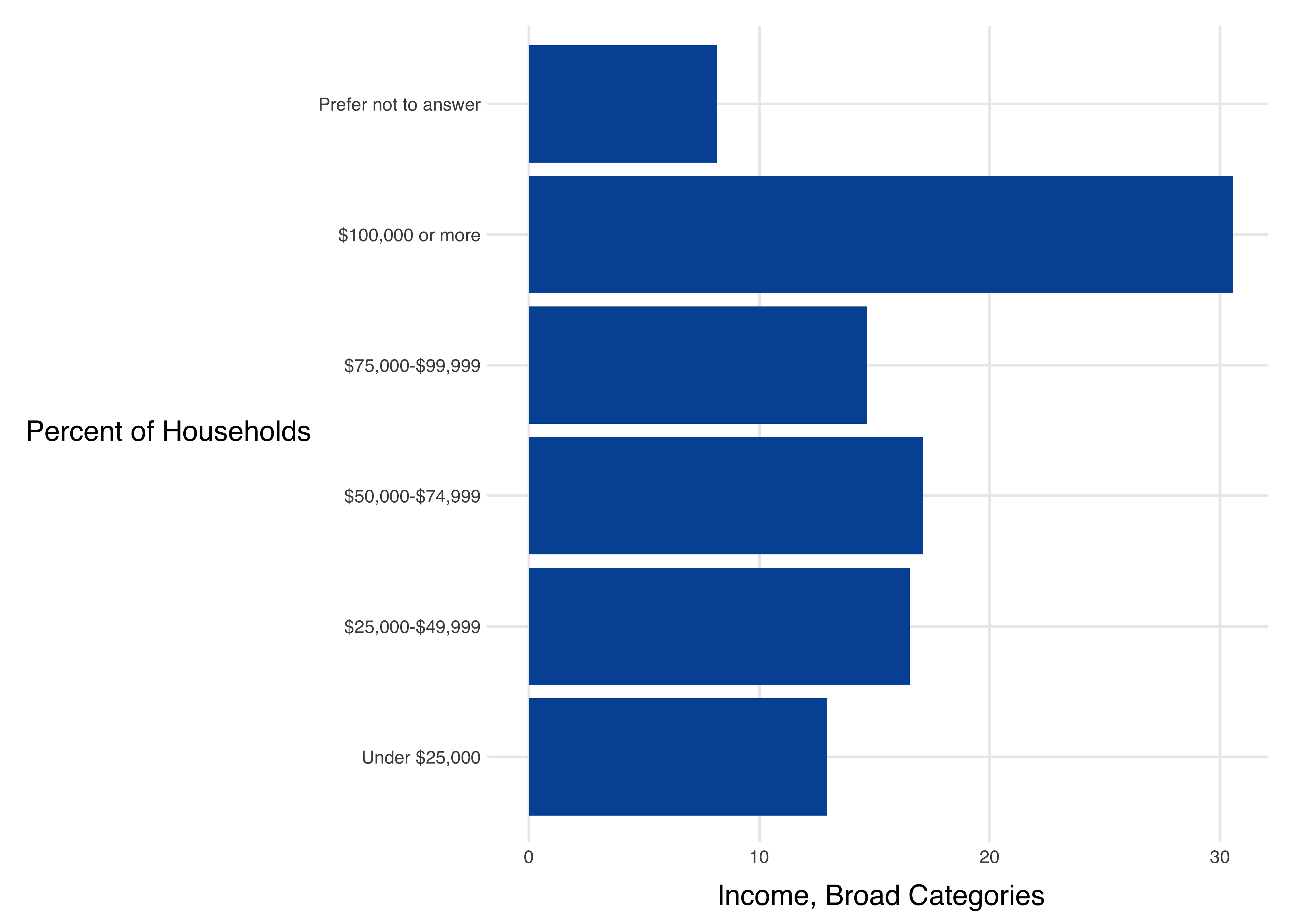
Be careful with count variables! Can’t simply take the mean:
tbi$hh %>%
  group_by(survey_year) %>%
  count(num_bicycles) %>%
  ungroup() %>%
  pivot_wider(names_from = survey_year, values_from = n) %>%
  gt::gt() %>%
gt::sub_missing(columns = c(2:4))| num_bicycles | 2019 | 2021 | 2023 |
|---|---|---|---|
| NA | 7516 | — | — |
| 0 (No bicycles) | — | 2468 | 1217 |
| 1 bicycle | — | 1944 | 893 |
| 2 bicycles | — | 1693 | 775 |
| 3 bicycles | — | 657 | 344 |
| 4 bicycles | — | 522 | 258 |
| 5 bicycles | — | 275 | 121 |
| 6 bicycles | — | 126 | 65 |
| 7 bicycles | — | 58 | 16 |
| 8 or more | — | 101 | 44 |
| Missing | — | 63 | 16 |
Summarizing MRCVs: Multiple Response Categorical Variables
Some questions in the survey allow respondents to check multiple options. Common examples include questions about race and ethnicity, or reasons for not traveling. These checkbox
variables, also known as multiple response categorical variables (MRCVs), are represented differently in the dataset from SRCVs (Single Response Categorical Variables) and have to be handled differently.
Let’s use no_travel as an example.
MRCV Names and Descriptions
What does the data actually look like for this question?
tbi$day %>%
  select(person_id, day_id, starts_with("no_travel")) %>%
  tail() %>%
gt::gt()| person_id | day_id | no_travel_other_specify | no_travel_8 | no_travel_9 | no_travel_4 | no_travel_5 | no_travel_6 | no_travel_2 | no_travel_99 | no_travel_7 | no_travel_3 | no_travel_11 | no_travel_1 | no_travel_12 |
|---|---|---|---|---|---|---|---|---|---|---|---|---|---|---|
| 2314127201 | 231412720103 | NA | Missing | Missing | Missing | Missing | Missing | Missing | Missing | Missing | Missing | Missing | Missing | Missing |
| 2311924101 | 231192410104 | NA | Not selected | Not selected | Not selected | Not selected | Not selected | Not selected | Selected | Not selected | Not selected | Not selected | Not selected | Not selected |
| 2302769301 | 230276930104 | NA | Not selected | Not selected | Not selected | Not selected | Not selected | Selected | Not selected | Not selected | Not selected | Not selected | Not selected | Not selected |
| 2303498001 | 230349800104 | NA | Not selected | Not selected | Selected | Not selected | Not selected | Not selected | Not selected | Not selected | Not selected | Not selected | Not selected | Not selected |
| 2312417001 | 231241700104 | NA | Not selected | Not selected | Selected | Not selected | Not selected | Not selected | Not selected | Not selected | Not selected | Not selected | Not selected | Not selected |
| 2315044102 | 231504410205 | NA | Not selected | Not selected | Selected | Not selected | Not selected | Not selected | Not selected | Not selected | Not selected | Not selected | Not selected | Not selected |
tbi$day %>%
  left_join(tbi$hh) %>%
  group_by(survey_year) %>%
  count(no_travel_11) %>%
  ungroup() %>%
  gt::gt()
Joining with `by = join_by(hh_id)`| survey_year | no_travel_11 | n |
|---|---|---|
| 2019 | Not selected | 6387 |
| 2019 | Selected | 889 |
| 2019 | Missing | 72280 |
| 2021 | Not selected | 7924 |
| 2021 | Selected | 458 |
| 2021 | Missing | 41185 |
| 2023 | Not selected | 4236 |
| 2023 | Selected | 355 |
| 2023 | Missing | 24247 |
Get the labels for these columns
nt_desc <- filter(variable_list, str_detect(variable, "no_travel")) %>%
  select(variable, description)

nt_desc %>%
gt::gt()| variable | description |
|---|---|
| no_travel_1 | Reason for no travel on date: I did make trips on date |
| no_travel_11 | Reason for no travel on date: Weather conditions (e.g., snowstorm) |
| no_travel_12 | Reason for no travel on date: person may have made trips, but I don't know when or where |
| no_travel_2 | Reason for no travel on date: Not scheduled to work/took day off |
| no_travel_3 | Reason for no travel on date: Worked at home for pay (e.g., telework, self-employed) |
| no_travel_4 | Reason for no travel on date: Hung out around home |
| no_travel_5 | Reason for no travel on date: Scheduled school closure (e.g., holiday) |
| no_travel_6 | Reason for no travel on date: No available transportation (e.g., no car, no bus) |
| no_travel_7 | Reason for no travel on date: Sick or quarantining (self or others) |
| no_travel_8 | Reason for no travel on date: Waited for visitor/delivery (e.g., plumber) |
| no_travel_9 | Reason for no travel on date: person did online/remote/home school |
| no_travel_99 | Reason for no travel on date: Other reason |
| no_travel_other_specify | Other reason for no travel on date open text answer |
Clean up labels by removing the common part.
nt_desc2 <- nt_desc %>%
  mutate(description = str_replace(
    description,
    "Reason for no travel on date: ",
    ""
  ))

nt_desc2 %>%
gt::gt()| variable | description |
|---|---|
| no_travel_1 | I did make trips on date |
| no_travel_11 | Weather conditions (e.g., snowstorm) |
| no_travel_12 | person may have made trips, but I don't know when or where |
| no_travel_2 | Not scheduled to work/took day off |
| no_travel_3 | Worked at home for pay (e.g., telework, self-employed) |
| no_travel_4 | Hung out around home |
| no_travel_5 | Scheduled school closure (e.g., holiday) |
| no_travel_6 | No available transportation (e.g., no car, no bus) |
| no_travel_7 | Sick or quarantining (self or others) |
| no_travel_8 | Waited for visitor/delivery (e.g., plumber) |
| no_travel_9 | person did online/remote/home school |
| no_travel_99 | Other reason |
| no_travel_other_specify | Other reason for no travel on date open text answer |
Remove parentheticals at the end.
nt_desc3 <- nt_desc2 %>%
  mutate(description = str_replace(
    description,
    " \\(.*\\)$",
    ""
  ))

nt_desc3 %>%
gt::gt()| variable | description |
|---|---|
| no_travel_1 | I did make trips on date |
| no_travel_11 | Weather conditions |
| no_travel_12 | person may have made trips, but I don't know when or where |
| no_travel_2 | Not scheduled to work/took day off |
| no_travel_3 | Worked at home for pay |
| no_travel_4 | Hung out around home |
| no_travel_5 | Scheduled school closure |
| no_travel_6 | No available transportation |
| no_travel_7 | Sick or quarantining |
| no_travel_8 | Waited for visitor/delivery |
| no_travel_9 | person did online/remote/home school |
| no_travel_99 | Other reason |
| no_travel_other_specify | Other reason for no travel on date open text answer |
Summarize MRCV Data
To summarize the data follow these steps:
- Select the columns
- Filter out all the days that are missing responses (i.e., they did travel)
- Filter out all the days that aren’t weighted (e.g. day not complete)
- Pivot data so we don’t have to work across columns
- Calculate the fraction of respondents that checked each option
- Label responses
Select the columns:
missing_value <- "Missing"

# Select the columns
nt_summary <-
  tbi$day %>%
  left_join(tbi$hh) %>%
  # select all the columns:
  select(survey_year, person_id, day_id, day_weight, starts_with("no_travel")) %>%
  # Get rid of open-ended text answer:
  select(-contains("other_specify"))
Joining with `by = join_by(hh_id)`nt_summary %>%
head(10) %>%
gt()| survey_year | person_id | day_id | day_weight | no_travel_8 | no_travel_9 | no_travel_4 | no_travel_5 | no_travel_6 | no_travel_2 | no_travel_99 | no_travel_7 | no_travel_3 | no_travel_11 | no_travel_1 | no_travel_12 |
|---|---|---|---|---|---|---|---|---|---|---|---|---|---|---|---|
| 2019 | 1822516701 | 182251670101 | 0 | Missing | Missing | Missing | Missing | Missing | Missing | Missing | Missing | Missing | Missing | NA | NA |
| 2019 | 1830175901 | 183017590101 | 0 | Missing | Missing | Missing | Missing | Missing | Missing | Missing | Missing | Missing | Missing | NA | NA |
| 2019 | 1831965201 | 183196520101 | 0 | Missing | Missing | Missing | Missing | Missing | Missing | Missing | Missing | Missing | Missing | NA | NA |
| 2019 | 1834127101 | 183412710101 | 0 | Missing | Missing | Missing | Missing | Missing | Missing | Missing | Missing | Missing | Missing | NA | NA |
| 2019 | 1834438301 | 183443830101 | 0 | Missing | Missing | Missing | Missing | Missing | Missing | Missing | Missing | Missing | Missing | NA | NA |
| 2019 | 1835758001 | 183575800101 | 0 | Missing | Missing | Missing | Missing | Missing | Missing | Missing | Missing | Missing | Missing | NA | NA |
| 2019 | 1836448001 | 183644800101 | 0 | Missing | Missing | Missing | Missing | Missing | Missing | Missing | Missing | Missing | Missing | NA | NA |
| 2019 | 1846241501 | 184624150101 | 0 | Missing | Missing | Missing | Missing | Missing | Missing | Missing | Missing | Missing | Missing | NA | NA |
| 2019 | 1849549501 | 184954950101 | 0 | Missing | Missing | Missing | Missing | Missing | Missing | Missing | Missing | Missing | Missing | NA | NA |
| 2019 | 1850835001 | 185083500101 | 0 | Missing | Missing | Missing | Missing | Missing | Missing | Missing | Missing | Missing | Missing | NA | NA |
Filter and pivot the data:
nt_summary <-
nt_summary %>%
# Filter out all the rows that aren't weighted (e.g. day not complete)
filter(
!is.na(day_weight) & day_weight > 0
) %>%
filter(
!if_all(starts_with("no_travel"), ~ . %in% c("Missing", NA))
) %>%
pivot_longer(cols = starts_with("no_travel"), names_to = "variable")
nt_summary %>%
  head(10) %>%
gt()| survey_year | person_id | day_id | day_weight | variable | value |
|---|---|---|---|---|---|
| 2019 | 1981190301 | 198119030102 | 29.49463 | no_travel_8 | Not selected |
| 2019 | 1981190301 | 198119030102 | 29.49463 | no_travel_9 | Not selected |
| 2019 | 1981190301 | 198119030102 | 29.49463 | no_travel_4 | Selected |
| 2019 | 1981190301 | 198119030102 | 29.49463 | no_travel_5 | Not selected |
| 2019 | 1981190301 | 198119030102 | 29.49463 | no_travel_6 | Not selected |
| 2019 | 1981190301 | 198119030102 | 29.49463 | no_travel_2 | Not selected |
| 2019 | 1981190301 | 198119030102 | 29.49463 | no_travel_99 | Not selected |
| 2019 | 1981190301 | 198119030102 | 29.49463 | no_travel_7 | Not selected |
| 2019 | 1981190301 | 198119030102 | 29.49463 | no_travel_3 | Not selected |
| 2019 | 1981190301 | 198119030102 | 29.49463 | no_travel_11 | Not selected |
Calculate the fraction of respondents that checked each option:
nt_summary <-
  nt_summary %>%
  # Remove missing responses
  filter(value != "Missing") %>%
  filter(!is.na(value)) %>%
  group_by(survey_year, variable, value) %>%
  summarize(
    wtd_num = sum(day_weight)
  ) %>%
  ungroup() %>%
  group_by(survey_year, variable) %>%
  mutate(wtd_pct = wtd_num / sum(wtd_num)) %>%
  ungroup()
`summarise()` has grouped output by 'survey_year', 'variable'. You can override
using the `.groups` argument.nt_summary %>%
head(10) %>%
gt()| survey_year | variable | value | wtd_num | wtd_pct |
|---|---|---|---|---|
| 2019 | no_travel_1 | NA | 461644.29 | 1.0000000 |
| 2019 | no_travel_11 | Not selected | 379270.90 | 0.8215652 |
| 2019 | no_travel_11 | Selected | 82373.39 | 0.1784348 |
| 2019 | no_travel_12 | NA | 461644.29 | 1.0000000 |
| 2019 | no_travel_2 | Not selected | 182081.96 | 0.8066498 |
| 2019 | no_travel_2 | Selected | 43644.20 | 0.1933502 |
| 2019 | no_travel_3 | Not selected | 185662.81 | 0.8225135 |
| 2019 | no_travel_3 | Selected | 40063.35 | 0.1774865 |
| 2019 | no_travel_4 | Not selected | 295412.61 | 0.6399139 |
| 2019 | no_travel_4 | Selected | 166231.68 | 0.3600861 |
Label responses and format table:
# Label responses
nt_summary <-
  nt_summary %>%
  # Label Responses
  left_join(nt_desc3, by = "variable")

# Put survey year in separate columns, format;
nt_summary %>%
  # Filter to the percent that "Selected" the response option:
  filter(value == "Selected") %>%
  filter(!is.na(value)) %>%
  select(survey_year, variable, description, wtd_pct) %>%
  pivot_wider(names_from = "survey_year", values_from = "wtd_pct") %>%
  gt() %>%
  gt::fmt_percent(columns = c(3:5), decimals = 1) %>%
gt::sub_missing(columns = c(3:5), missing_text = "--")| variable | description | 2019 | 2021 | 2023 |
|---|---|---|---|---|
| no_travel_11 | Weather conditions | 17.8% | 4.1% | 8.9% |
| no_travel_2 | Not scheduled to work/took day off | 19.3% | 12.5% | 10.9% |
| no_travel_3 | Worked at home for pay | 17.7% | 22.0% | 22.3% |
| no_travel_4 | Hung out around home | 36.0% | 52.3% | 47.0% |
| no_travel_5 | Scheduled school closure | 7.7% | 1.6% | 2.8% |
| no_travel_6 | No available transportation | 2.6% | 1.2% | 1.5% |
| no_travel_7 | Sick or quarantining | 12.0% | 6.2% | 6.3% |
| no_travel_8 | Waited for visitor/delivery | 1.4% | 1.6% | 1.1% |
| no_travel_9 | person did online/remote/home school | 0.9% | 2.8% | 3.2% |
| no_travel_99 | Other reason | 14.1% | 11.3% | 11.4% |
| no_travel_1 | I did make trips on date | – | 1.0% | 1.1% |
| no_travel_12 | person may have made trips, but I don't know when or where | – | 0.7% | 1.2% |
Working with Weights
Weighted proportions are calculated here in two different ways. First, they are calculated manually to illustrate a simple approach.
Second, the {srvyr} package (basically a wrapper around the {survey} package) is demonstrated to calculate standard errors and confidence intervals as well as the proportions themselves.
Weighted Proportions
To calculate weighted proportions, or weighted counts, we simply sum the weights instead of counting the number of rows.
tbl <- tbi$hh %>%
  group_by(income_broad) %>%
  summarize(N = n(), wtd_N = sum(hh_weight)) %>%
  mutate(prop = N / sum(N), wtd_prop = wtd_N / sum(wtd_N)) %>%
  ungroup()

tbl %>%
  gt::gt() %>%
  gt::fmt_number(columns = c(2:3), decimals = 0) %>%
gt::fmt_percent(columns = c(4:5), decimals = 1)| income_broad | N | wtd_N | prop | wtd_prop |
|---|---|---|---|---|
| Under $25,000 | 2,480 | 620,099 | 12.9% | 13.7% |
| $25,000-$49,999 | 3,169 | 813,693 | 16.5% | 18.0% |
| $50,000-$74,999 | 3,279 | 644,296 | 17.1% | 14.3% |
| $75,000-$99,999 | 2,816 | 567,726 | 14.7% | 12.6% |
| $100,000 or more | 5,861 | 1,501,144 | 30.6% | 33.2% |
| Prefer not to answer | 1,567 | 372,129 | 8.2% | 8.2% |
tbl %>%
  ggplot(aes(x = income_broad, y = wtd_prop)) +
  geom_col(fill = councilR::colors$councilBlue) +
  councilR::theme_council_open() +
  coord_flip()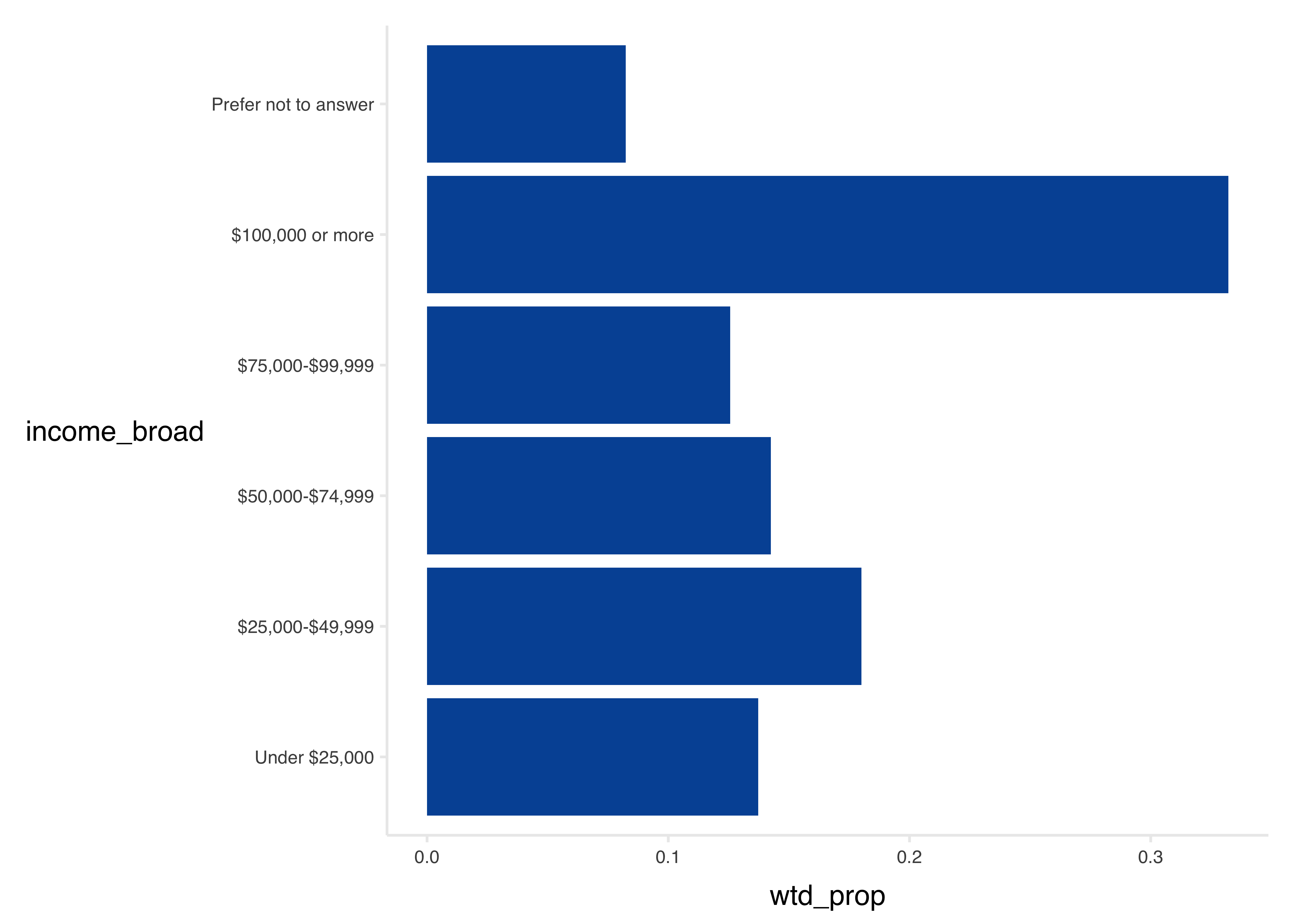
Using the {srvyr} Package
Here the {srvyr} package is used to calculate the standard error as well.
The {srvyr} package uses a design object instead of the data directly. This contains information about the survey design.
# Define the design
hh_design <- tbi$hh %>%
  filter(!is.na(hh_weight)) %>%
  as_survey_design(
    ids = hh_id,
    weights = hh_weight,
    strata = sample_segment
  )
tbl <- hh_design %>%
group_by(income_broad) %>%
summarize(
N = n(),
wtd_est = survey_total(vartype = "se"),
wtd_prop = survey_prop(vartype = "se", proportion = TRUE)
) %>%
ungroup()
tbl %>%
gt::gt() %>%
gt::fmt_number(columns = c(2:4), decimals = 0) %>%
gt::fmt_percent(columns = c(5:6), decimals = 1)| income_broad | N | wtd_est | wtd_est_se | wtd_prop | wtd_prop_se |
|---|---|---|---|---|---|
| Under $25,000 | 2,480 | 620,099 | 20,079 | 13.7% | 0.4% |
| $25,000-$49,999 | 3,169 | 813,693 | 22,047 | 18.0% | 0.5% |
| $50,000-$74,999 | 3,279 | 644,296 | 19,284 | 14.3% | 0.4% |
| $75,000-$99,999 | 2,816 | 567,726 | 18,379 | 12.6% | 0.4% |
| $100,000 or more | 5,861 | 1,501,144 | 31,250 | 33.2% | 0.6% |
| Prefer not to answer | 1,567 | 372,129 | 15,522 | 8.2% | 0.3% |
tbl %>%
  ggplot(aes(x = income_broad, y = wtd_prop)) +
  geom_col(fill = councilR::colors$councilBlue) +
  geom_linerange(
    aes(ymin = wtd_prop - wtd_prop_se, ymax = wtd_prop + wtd_prop_se)
  ) +
  coord_flip() +
  councilR::theme_council_open()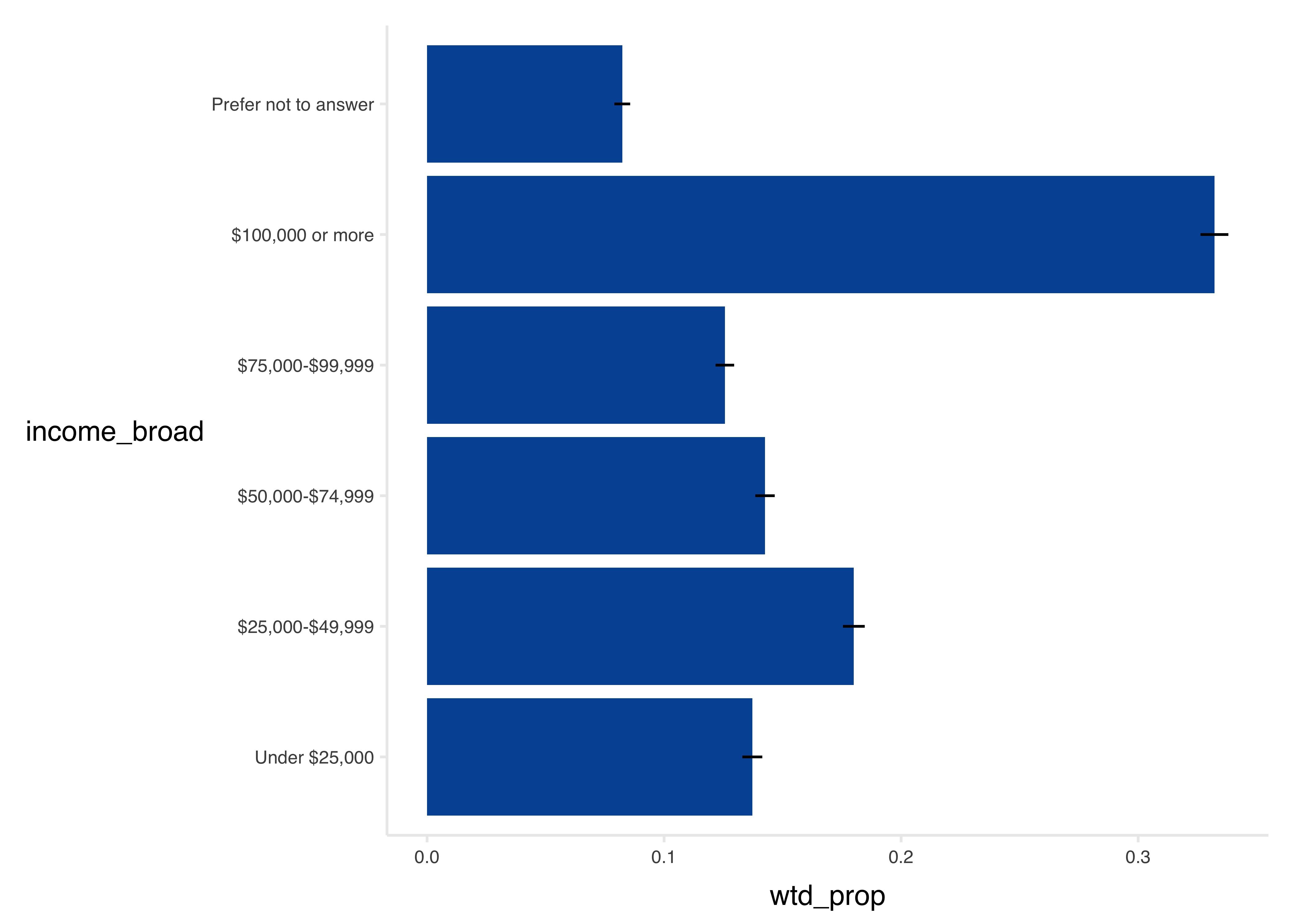
A Note on Sample Strata
In the code above, the survey design specifies strata
, corresponding to the sample segments from the sample plan. Specifying strata improves the precision of confidence intervals and standard errors, but does not change the point estimates.
In survey data analysis, strata are used to ensure that the sample is representative of key subgroups in the population or when survey sampling rates differed across subpopulations or subgeographies. In the Travel Behavior Inventory, Core Urban sample segments were oversampled, and hence strata specification (using sample segments as strata) is warranted.
Failing to specify strata, while not exactly correct, rarely has more than a miniscule effect on error estimates. In the example below, we show how confidence intervals are affected by specifying strata in the survey design object.
Weighted Proportion by Another Variable
Calculating proportions grouped by another variable requires some thought as to the weights applied.
Variables in the Same Table
Here we calculate income by home county. Both variables are household-level variables, so household weights are applied.
tbl %>%
  mutate(home_county = gsub(" County, MN| County, WI", "", home_county)) %>%
  ggplot(aes(x = income_broad, y = wtd_prop)) +
  geom_col(fill = councilR::colors$councilBlue) +
  geom_linerange(
    aes(ymin = wtd_prop - wtd_prop_se, ymax = wtd_prop + wtd_prop_se)
  ) +
  coord_flip() +
  facet_wrap(~home_county) +
  councilR::theme_council_open()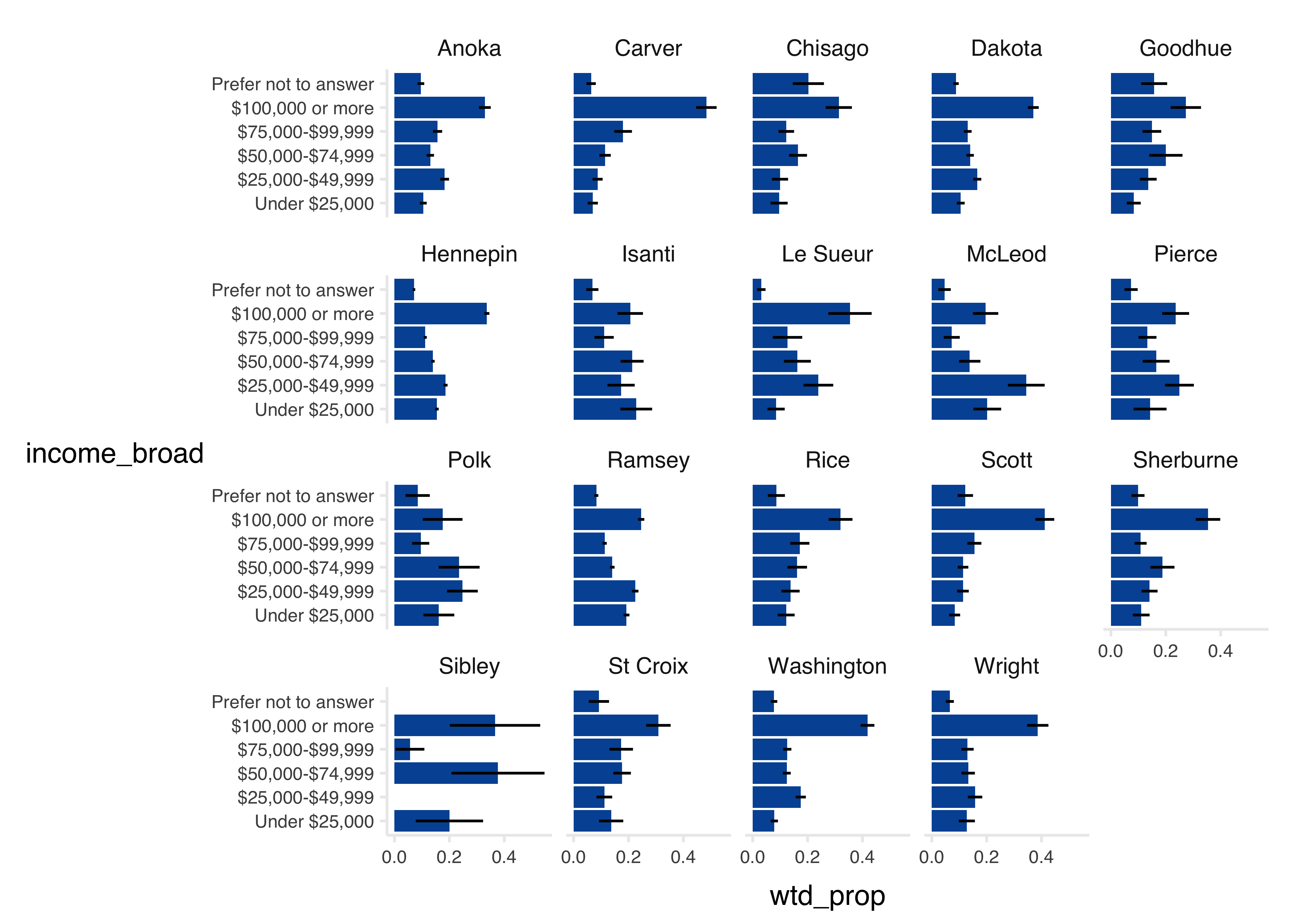
Variables in Different Tables
When the crosstab variables are in different tables, the general rule of thumb is to use the weight from the lowest level of the weighting hierarchy: trip weights, day weights, person weights, and finally household weights.
| Weight to Use When Creating Weighted Crosstabs for Variables From One or Two Tables | |||||||
|---|---|---|---|---|---|---|---|
| TABLE 2 | |||||||
| hh | vehicle | person | day | trip | trip_purpose | ||
| TABLE 1 | hh | hh_weight | |||||
| vehicle | hh_weight | hh_weight | |||||
| person | person_weight | person_weight | person_weight | ||||
| day | day_weight | day_weight | day_weight | day_weight | |||
| trip | trip_weight | trip_weight | trip_weight | trip_weight | trip_weight | ||
| trip_purpose* | trip_purpose_weight | trip_purpose_weight | trip_purpose_weight | trip_purpose_weight | ** | trip_purpose_weight | |
| *This table is provided solely for analyses of overall trip purpose. **Do not join without first aggregating trip measures to linked trip IDs. |
|||||||
Example 1: Telework by County
For example, to find the proportion of people who teleworked part-time before the pandemic (a person-level variable) by home county (a household-level variable), the data user joins the household and person tables, then summarizes the person weight for a weighted estimate.
tab <- tbi$person %>%
  left_join(tbi$hh, by = "hh_id") %>%
  filter(survey_year == 2023) %>%
  group_by(home_county, job_type_pre_covid) %>%
  summarize(wtd_population = sum(person_weight)) %>%
  ungroup() %>%
  group_by(home_county) %>%
  mutate(wtd_prop_population = wtd_population / sum(wtd_population)) %>%
  ungroup()
`summarise()` has grouped output by 'home_county'. You can override using the
`.groups` argument.tab %>%
head(12) %>%
gt::gt() %>%
gt::fmt_percent(columns = 4) %>%
gt::fmt_number(columns = 3, decimals = 0)| home_county | job_type_pre_covid | wtd_population | wtd_prop_population |
|---|---|---|---|
| Anoka County, MN | Went to one work location ONLY (outside of home) | 142,719 | 42.30% |
| Anoka County, MN | Work location regularly varied (different offices/jobsites) | 10,191 | 3.02% |
| Anoka County, MN | Worked ONLY from home or remotely (telework, self-employed) | 10,790 | 3.20% |
| Anoka County, MN | Drove/biked/traveled for work (driver, sales, deliveries) | 2,366 | 0.70% |
| Anoka County, MN | Teleworked some days and traveled to a work location some days | 10,012 | 2.97% |
| Anoka County, MN | Missing | 161,314 | 47.81% |
| Carver County, MN | Went to one work location ONLY (outside of home) | 39,615 | 35.90% |
| Carver County, MN | Work location regularly varied (different offices/jobsites) | 4,480 | 4.06% |
| Carver County, MN | Worked ONLY from home or remotely (telework, self-employed) | 6,967 | 6.31% |
| Carver County, MN | Teleworked some days and traveled to a work location some days | 5,048 | 4.58% |
| Carver County, MN | Missing | 54,226 | 49.15% |
| Chisago County, MN | Went to one work location ONLY (outside of home) | 26,314 | 53.18% |
Example 2: Trip Distance by Mode
In this second example, we find the percent of trips that are under 1, 5, or 10 miles for each mode. This kind of analysis might be used to answer the question what percent of drive trips are short enough that they might be shifted to [walking/biking]?
In this example, we use srvyr to get both the weighted proportions and their standard errors.
The results below show that, in 2023, 15.6% of drive drips were less than 1 mile long, compared to 84.5% of walk trips.
tab <- tbi$trip %>%
  left_join(select(tbi$hh, "hh_id", "sample_segment", "survey_year")) %>%
  filter(!is.na(distance_miles)) %>%
  filter(survey_year == 2023) %>%
  mutate(distance_category = case_when(distance_miles < 1 ~ "Less than 1 mile",
    distance_miles < 5 ~ "1-5 miles",
    distance_miles < 10 ~ "5-10 miles",
    distance_miles >= 10 ~ "10 miles or more",
    .default = "Missing"
  )) %>%
  as_survey_design(
    ids = trip_id,
    weights = trip_weight,
    strata = sample_segment
  ) %>%
  group_by(survey_year, mode_type, distance_category) %>%
  summarize(prop = survey_prop(proportion = FALSE)) %>%
  ungroup()
Joining with `by = join_by(hh_id)`tab %>%
mutate(distance_category = factor(distance_category,
levels = c(
"Less than 1 mile",
"1-5 miles",
"5-10 miles",
"10 miles or more"
)
)) %>%
arrange(mode_type, distance_category) %>%
filter(mode_type %in% c("Walk", "Household Vehicle")) %>%
head(12) %>%
gt::gt() %>%
gt::fmt_percent(columns = 4:5, decimals = 1)| survey_year | mode_type | distance_category | prop | prop_se |
|---|---|---|---|---|
| 2023 | Household Vehicle | Less than 1 mile | 15.6% | 0.4% |
| 2023 | Household Vehicle | 1-5 miles | 43.0% | 0.5% |
| 2023 | Household Vehicle | 5-10 miles | 18.7% | 0.4% |
| 2023 | Household Vehicle | 10 miles or more | 22.7% | 0.5% |
| 2023 | Walk | Less than 1 mile | 84.5% | 1.0% |
| 2023 | Walk | 1-5 miles | 12.6% | 0.9% |
| 2023 | Walk | 5-10 miles | 1.3% | 0.4% |
| 2023 | Walk | 10 miles or more | 1.5% | 0.4% |
Sample Analyses
Weighted Trip Rates
To calculate a weighted trip rate (the number of trips per day), the number of weighted trips is divided by the number of weighted travel days.
For example:
- If there are 300,000 weighted person-trips across 75,000 person-days, then the average person-trip rate is 4.0 per day.
- If there are 225,000 person-trips by car across 75,000 person-days, then the person-trip rate for car trips is 3.0.
Note: Travel days with no trips are not represented in the trip table! They must be obtained by performing a join on the day table.
Weighted trip rates can either be calculated using the unlinked trip table (trip
), or the linked trip table (linked_trip
). The unlinked trip rate represents the number of trips made inclusive of multi-part journeys, like walking to a bus stop. The linked trip table consolidates these multi-trip journeys into a single trip record. As a result, linked trip rates are always lower than unlinked trip rates.
trip_counts <- tbi$trip %>%
  filter(!is.na(trip_weight) & trip_weight > 0) %>%
  group_by(day_id) %>%
  summarize(wtd_num_trips = sum(trip_weight)) %>%
  ungroup()

trip_counts %>%
  tail(10) %>%
gt::gt()| day_id | wtd_num_trips |
|---|---|
| 231735820302 | 1439.4171 |
| 231735820402 | 1439.4171 |
| 231735820502 | 1439.4171 |
| 231737120101 | 1335.3016 |
| 231737120201 | 1573.3379 |
| 231737120301 | 511.6536 |
| 231737120401 | 255.8268 |
| 231737990101 | 989.7791 |
| 231737990102 | 395.9116 |
| 231737990103 | 791.8233 |
# Join to day table

trip_counts <- tbi$day %>%
  filter(day_weight > 0) %>%
  select(hh_id, day_id, day_weight) %>%
  left_join(trip_counts, by = "day_id") %>%
  left_join(select(tbi$hh, hh_id, sample_segment, income_broad), by = "hh_id")


trip_counts %>%
  tail(10) %>%
gt::gt()| hh_id | day_id | day_weight | wtd_num_trips | sample_segment | income_broad |
|---|---|---|---|---|---|
| 23034980 | 230349800107 | 62.45773 | NA | Core Urban BGs | $100,000 or more |
| 23050326 | 230503260101 | 734.23731 | NA | Core Urban BGs | Prefer not to answer |
| 23088895 | 230888950101 | 50.31765 | 123.4231 | Core Urban BGs | $50,000-$74,999 |
| 23049602 | 230496020301 | 2573.17431 | NA | Core Urban BGs | $100,000 or more |
| 23033885 | 230338850301 | 512.73826 | 1061.1328 | Core Urban BGs | $100,000 or more |
| 23150441 | 231504410202 | 115.50532 | NA | Core Rural | $75,000-$99,999 |
| 23125965 | 231259650203 | 99.00411 | 198.0082 | Core Urban BGs | $100,000 or more |
| 23003220 | 230032200103 | 34.53968 | NA | Core Urban BGs | Under $25,000 |
| 23092788 | 230927880205 | 99.07492 | 693.5245 | Core Urban BGs | $100,000 or more |
| 23089592 | 230895920105 | 49.98151 | NA | Core Urban BGs | $100,000 or more |
Replace the NAs with 0s.
trip_counts <- trip_counts %>%
  mutate(wtd_num_trips = replace_na(wtd_num_trips, 0))

trip_counts %>%
  tail(10) %>%
gt::gt()| hh_id | day_id | day_weight | wtd_num_trips | sample_segment | income_broad |
|---|---|---|---|---|---|
| 23034980 | 230349800107 | 62.45773 | 0.0000 | Core Urban BGs | $100,000 or more |
| 23050326 | 230503260101 | 734.23731 | 0.0000 | Core Urban BGs | Prefer not to answer |
| 23088895 | 230888950101 | 50.31765 | 123.4231 | Core Urban BGs | $50,000-$74,999 |
| 23049602 | 230496020301 | 2573.17431 | 0.0000 | Core Urban BGs | $100,000 or more |
| 23033885 | 230338850301 | 512.73826 | 1061.1328 | Core Urban BGs | $100,000 or more |
| 23150441 | 231504410202 | 115.50532 | 0.0000 | Core Rural | $75,000-$99,999 |
| 23125965 | 231259650203 | 99.00411 | 198.0082 | Core Urban BGs | $100,000 or more |
| 23003220 | 230032200103 | 34.53968 | 0.0000 | Core Urban BGs | Under $25,000 |
| 23092788 | 230927880205 | 99.07492 | 693.5245 | Core Urban BGs | $100,000 or more |
| 23089592 | 230895920105 | 49.98151 | 0.0000 | Core Urban BGs | $100,000 or more |
Finally, calculate the mean. Note that it is not appropriate to calculate the mean trip rate with the mean function.
trip_counts %>%
  summarize(
    N = n(),
    correct = sum(wtd_num_trips) / sum(day_weight),
    INCORRECT = mean(wtd_num_trips / day_weight)
  ) %>%
gt::gt()| N | correct | INCORRECT |
|---|---|---|
| 64015 | 3.544836 | 4.031447 |
As a simple demonstration of why there is a difference:
foo <- data.frame(trips = c(2, 10), days = c(2, 5))
foo %>%
gt::gt()| trips | days |
|---|---|
| 2 | 2 |
| 10 | 5 |
foo %>%
  summarize(
    correct = sum(trips) / sum(days),
    INCORRECT = mean(trips / days)
  ) %>%
  gt::gt() %>%
gt::fmt_number(columns = c(1:2), decimals = 2)| correct | INCORRECT |
|---|---|
| 1.71 | 1.50 |
To use srvyr, simply specify the calculation in the call to survey_mean.
tc_design <- trip_counts %>%
  as_survey_design(
    ids = day_id,
    weights = day_weight,
    strata = sample_segment
  )

tc_design %>%
  summarize(
    N = n(),
    wtd_trip_rate = survey_mean(wtd_num_trips / day_weight)
  ) %>%
  gt() %>%
gt::fmt_number(columns = c(2:3), decimals = 2)| N | wtd_trip_rate | wtd_trip_rate_se |
|---|---|---|
| 64015 | 3.54 | 0.02 |
Calculate by group as well.
tc_design %>%
  group_by(income_broad) %>%
  summarize(
    N = n(),
    wtd_trip_rate = survey_mean(wtd_num_trips / day_weight)
  ) %>%
  ungroup() %>%
  gt() %>%
  gt::fmt_number(columns = c(2), decimals = 0) %>%
gt::fmt_number(columns = c(3:4), decimals = 2)| income_broad | N | wtd_trip_rate | wtd_trip_rate_se |
|---|---|---|---|
| Under $25,000 | 5,315 | 3.24 | 0.09 |
| $25,000-$49,999 | 8,182 | 3.45 | 0.07 |
| $50,000-$74,999 | 10,042 | 3.49 | 0.06 |
| $75,000-$99,999 | 10,481 | 3.66 | 0.07 |
| $100,000 or more | 25,721 | 3.72 | 0.04 |
| Prefer not to answer | 4,274 | 3.09 | 0.08 |
To recap, when calculating a simple aggregate trip rate, joins are made to the day table to account for days without travel. The user:
- Gets the weighted number of trips for each day from the trip table.
- Joins to the day table.
- Fills in the weighted number of trips with zeros for those days without travel.
Summary statistics can then be created from the weighted number of trips divided by the day weight. The code below consolidates the example walk through from above:
trip_counts <- tbi$trip %>%
  filter(!is.na(trip_weight) & trip_weight > 0) %>%
  group_by(day_id) %>%
  summarize(wtd_num_trips = sum(trip_weight)) %>%
  ungroup()

trip_counts <- tbi$day %>%
  filter(day_weight > 0) %>%
  select(hh_id, day_id, day_weight) %>%
  left_join(trip_counts, by = "day_id") %>%
  left_join(select(tbi$hh, hh_id, sample_segment, survey_year),
    by = "hh_id"
  )

trip_counts <- trip_counts %>%
  mutate(wtd_num_trips = replace_na(wtd_num_trips, 0))

trip_counts %>%
  as_survey_design(
    ids = day_id,
    weights = day_weight,
    strata = sample_segment
  ) %>%
  group_by(survey_year) %>%
  summarize(
    N = n(),
    wtd_trip_rate = survey_mean(wtd_num_trips / day_weight)
  ) %>%
  ungroup() %>%
  gt() %>%
  gt::fmt_number(columns = c(2), decimals = 0) %>%
gt::fmt_number(columns = c(3:4), decimals = 2)| survey_year | N | wtd_trip_rate | wtd_trip_rate_se |
|---|---|---|---|
| 2019 | 32,150 | 4.19 | 0.04 |
| 2021 | 20,780 | 2.87 | 0.04 |
| 2023 | 11,085 | 3.58 | 0.05 |
Special Case: Trip Rates by a Trip Variable
When calculating trip rates by a trip attribute (i.e., a variable in the trip table) the user must not only account for days without travel, but also days without trips that match that attribute. In the case of mode type, this requires an expansion of the dataset to encompass every day, and every mode.
For example, to find trip rates by mode, the user:
Calculates the weighted number of trips by mode and day ID.
Expands the trip count data frame to include days without travel by each mode. In the code below, this is done by creating an empty data frame containing every combination of day_id and mode_type.
Fills in missing values for the weighted number of trips with zeros, representing days without travel by that mode type.
# Weighted number of trips by mode type and day:
trip_counts <- tbi$trip %>%
  filter(!is.na(trip_weight) & trip_weight > 0) %>%
  group_by(day_id, mode_type) %>%
  summarize(wtd_num_trips = sum(trip_weight)) %>%
  ungroup()
`summarise()` has grouped output by 'day_id'. You can override using the
`.groups` argument.# An empty data frame to hold every combination of day id and
empty_grid <- expand.grid(
day_id = tbi$day$day_id,
mode_type = levels(tbi$trip$mode_type)
)
empty_grid$mode_type <- factor(empty_grid$mode_type,
levels = levels(tbi$trip$mode_type),
ordered = TRUE
)
all_levels <- union(levels(trip_counts$mode_type), levels(empty_grid$mode_type))
# Align levels
trip_counts$mode_type <- factor(trip_counts$mode_type, levels = all_levels, ordered = TRUE)
empty_grid$mode_type <- factor(empty_grid$mode_type, levels = all_levels, ordered = TRUE)
# Join to our empty grid of modes and days:
trip_counts <- empty_grid %>%
left_join(trip_counts, by = c("day_id", "mode_type")) # can you fill NAs with zeros here?
# Fill in zeros:
trip_counts <- trip_counts %>%
mutate(wtd_num_trips = nafill(wtd_num_trips, fill = 0))
trip_counts %>%
head(10) %>%
gt()| day_id | mode_type | wtd_num_trips |
|---|---|---|
| 182251670101 | Rail | 0 |
| 183017590101 | Rail | 0 |
| 183196520101 | Rail | 0 |
| 183412710101 | Rail | 0 |
| 183443830101 | Rail | 0 |
| 183575800101 | Rail | 0 |
| 183644800101 | Rail | 0 |
| 184624150101 | Rail | 0 |
| 184954950101 | Rail | 0 |
| 185083500101 | Rail | 0 |
Once created, the expanded table of trip counts can be joined to other, non-trip tables and summarized in the same manner as other trip rate crosstabs. For example, to calculate trip rate by home county and mode type:
trip_counts %>%
  left_join(tbi$day) %>%
  left_join(tbi$hh) %>%
  group_by(survey_year, home_county, mode_type) %>%
  summarize(trip_rate = sum(wtd_num_trips) / sum(day_weight)) %>%
  ungroup() %>%
  head(10) %>%
  gt()
Joining with `by = join_by(day_id)`
Joining with `by = join_by(hh_id)`
`summarise()` has grouped output by 'survey_year', 'home_county'. You can
override using the `.groups` argument.| survey_year | home_county | mode_type | trip_rate |
|---|---|---|---|
| 2019 | Anoka County, MN | Rail | 0.003992510 |
| 2019 | Anoka County, MN | School Bus | 0.078010777 |
| 2019 | Anoka County, MN | Public Bus | 0.033112483 |
| 2019 | Anoka County, MN | Other Bus | 0.018334470 |
| 2019 | Anoka County, MN | Long distance passenger mode | 0.002931250 |
| 2019 | Anoka County, MN | Smartphone ridehailing service | 0.001922443 |
| 2019 | Anoka County, MN | For-Hire Vehicle | 0.001066327 |
| 2019 | Anoka County, MN | Household Vehicle | 3.434414204 |
| 2019 | Anoka County, MN | Other Vehicle | 0.180770027 |
| 2019 | Anoka County, MN | Micromobility | 0.023927973 |
To extend this process to multiple trip variables, such as trip mode and trip departure hour, the empty data frame simply needs to be expanded to include the second variable before joining and filling in days without travel.
empty_grid <- expand.grid(
  day_id = tbi$day$day_id,
  mode_type = value_labels_upcoded[variable == "mode_type", value],
  depart_hour = 0:23
)

empty_grid %>%
  head(10) %>%
gt()| day_id | mode_type | depart_hour |
|---|---|---|
| 182251670101 | 1 | 0 |
| 183017590101 | 1 | 0 |
| 183196520101 | 1 | 0 |
| 183412710101 | 1 | 0 |
| 183443830101 | 1 | 0 |
| 183575800101 | 1 | 0 |
| 183644800101 | 1 | 0 |
| 184624150101 | 1 | 0 |
| 184954950101 | 1 | 0 |
| 185083500101 | 1 | 0 |
Weighted Mode Share
Mode share represents the proportion of trips taken by walking, driving, biking, transit, and other modes. It is calculated from the linked trip table.
Prepare the design object for srvyr:
trips1 <- tbi$linked_trip %>%
  left_join(select(tbi$hh, hh_id, sample_segment), by = "hh_id") %>%
  filter(!is.na(linked_trip_weight) & linked_trip_weight > 0)

trip_design <- trips1 %>%
  as_survey_design(
    ids = linked_trip_id,
    weights = linked_trip_weight,
    strata = sample_segment
  )
Calculate and label:
tbl <- trip_design %>%
  group_by(mode_type) %>%
  summarize(
    N = n(),
    wtd_N = sum(linked_trip_weight),
    wtd_prop = survey_prop(vartype = "se", proportion = TRUE)
  ) %>%
  ungroup()
tbl %>%
select(mode_type, N, wtd_N, wtd_prop, wtd_prop_se) %>%
arrange(desc(wtd_prop)) %>%
gt::gt() %>%
gt::fmt_number(columns = c(2:3), decimals = 0) %>%
gt::fmt_percent(columns = c(4:5), decimals = 1) %>%
gt::sub_small_vals(threshold = 0.001, small_pattern = "<0.1%")| mode_type | N | wtd_N | wtd_prop | wtd_prop_se |
|---|---|---|---|---|
| Household Vehicle | 180,512 | 31,374,063 | 80.3% | 0.2% |
| Walk | 29,051 | 3,437,077 | 8.8% | 0.1% |
| Other Vehicle | 13,277 | 1,913,337 | 4.9% | <0.1% |
| School Bus | 2,876 | 716,939 | 1.8% | <0.1% |
| Micromobility | 3,734 | 391,142 | 1.0% | <0.1% |
| Public Bus | 4,596 | 376,769 | 1.0% | <0.1% |
| Other | 1,856 | 286,898 | 0.7% | <0.1% |
| Smartphone ridehailing service | 901 | 129,296 | 0.3% | <0.1% |
| Missing | 476 | 118,171 | 0.3% | <0.1% |
| Other Bus | 806 | 116,212 | 0.3% | <0.1% |
| Rail | 1,841 | 91,470 | 0.2% | <0.1% |
| Long distance passenger mode | 400 | 57,953 | 0.1% | <0.1% |
| For-Hire Vehicle | 219 | 48,910 | 0.1% | <0.1% |
Plot:
tbl <- tbl %>%
  mutate(mode_type = mode_type %>%
    fct_reorder(wtd_prop) %>%
    fct_relevel("Other"))

ggplot(tbl, aes(x = mode_type, y = wtd_prop)) +
  geom_col(fill = councilR::colors$councilBlue) +
  geom_linerange(
    aes(ymin = wtd_prop - wtd_prop_se, ymax = wtd_prop + wtd_prop_se),
    linewidth = 1.2
  ) +
  coord_flip() +
  labs(
    title = "Mode share of trips",
    x = "",
    y = "Weighted proportion"
  ) +
  councilR::theme_council_open()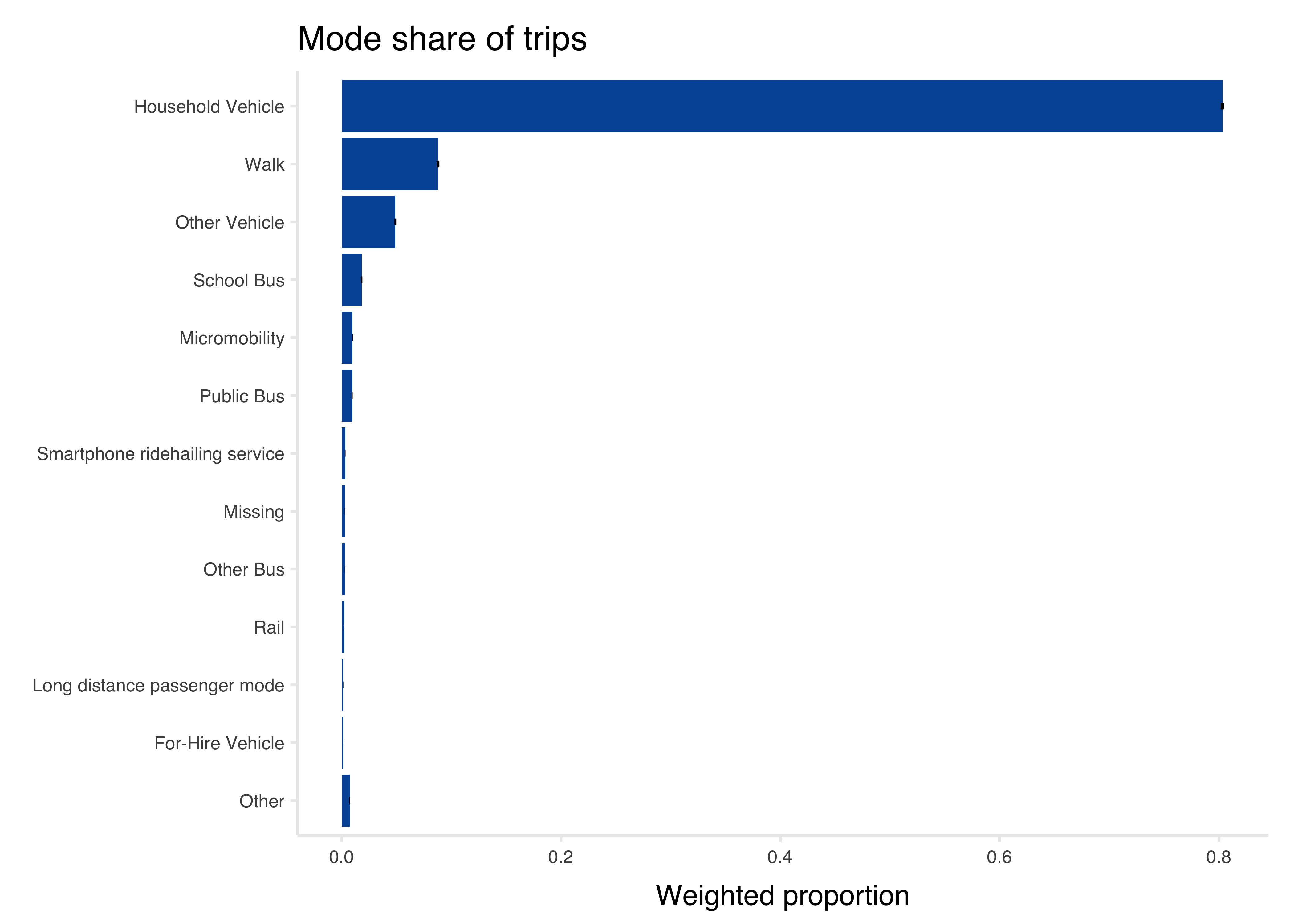
Weighted VMT
Vehicle miles traveled at a trip-level is the miles traveled for any auto trip, divided by auto occupancy (num_travelers on the vehicle trip, inclusive of the driver).
auto_modes <- c(
  "Household Vehicle",
  "Other Vehicle",
  "For-Hire Vehicle",
  "Smartphone ridehailing service"
)

vmt <- tbi$trip %>%
  mutate(vmt = ifelse(mode_type %in% auto_modes, distance_miles / as.numeric(num_travelers), 0))

vmt %>%
  select(trip_id, mode_type, distance_miles, num_travelers, vmt, trip_weight) %>%
  head(15) %>%
gt()| trip_id | mode_type | distance_miles | num_travelers | vmt | trip_weight |
|---|---|---|---|---|---|
| 1948330701004 | Household Vehicle | 0.23488 | 1 traveler | 0.23488 | 0.00000 |
| 1948330701003 | Household Vehicle | 0.23488 | 1 traveler | 0.23488 | 0.00000 |
| 1979608101002 | Micromobility | 0.06474 | 1 traveler | 0.00000 | 39.22129 |
| 1979608101009 | Micromobility | 0.06564 | 1 traveler | 0.00000 | 0.00000 |
| 1852656801004 | Micromobility | 0.14230 | 5+ travelers | 0.00000 | 80.41805 |
| 1873245201038 | Rail | 0.41876 | 1 traveler | 0.00000 | 0.00000 |
| 1917694203001 | Other Vehicle | 0.78029 | 1 traveler | 0.78029 | 0.00000 |
| 1917694203025 | Micromobility | 0.70227 | 1 traveler | 0.00000 | 471.42069 |
| 1917694203015 | Micromobility | 0.69517 | 1 traveler | 0.00000 | 471.42069 |
| 1917694203016 | Micromobility | 0.23870 | 1 traveler | 0.00000 | 471.42069 |
| 1917694203024 | Micromobility | 0.40851 | 1 traveler | 0.00000 | 471.42069 |
| 1965884901032 | Micromobility | 0.37715 | 2 travelers | 0.00000 | 0.00000 |
| 1928817801004 | Micromobility | 0.57222 | 1 traveler | 0.00000 | 0.00000 |
| 1928817801010 | Micromobility | 0.74898 | 1 traveler | 0.00000 | 178.52850 |
| 1976150402010 | Micromobility | 0.41479 | 1 traveler | 0.00000 | 110.79780 |
VMT statistics are very sensitive to outliers. Removing vehicle trips that are flagged
as having excessively high speeds (over 100 mph) is recommended. These are likely trips where the user incorrectly classified a trip in their survey.
vmt <- vmt %>%
  mutate(vmt = ifelse(speed_mph >= 100, 0, vmt))
To scale up individual VMT records to the region, we multiply VMT for each trip by its corresponding trip weight. This is weighted VMT.
weighted_vmt <- vmt %>%
  mutate(weighted_vmt = vmt * trip_weight)

weighted_vmt %>%
  select(trip_id, mode_type, distance_miles, num_travelers, vmt, trip_weight) %>%
  head(15) %>%
gt()| trip_id | mode_type | distance_miles | num_travelers | vmt | trip_weight |
|---|---|---|---|---|---|
| 1948330701004 | Household Vehicle | 0.23488 | 1 traveler | NA | 0.00000 |
| 1948330701003 | Household Vehicle | 0.23488 | 1 traveler | NA | 0.00000 |
| 1979608101002 | Micromobility | 0.06474 | 1 traveler | 0.00000 | 39.22129 |
| 1979608101009 | Micromobility | 0.06564 | 1 traveler | 0.00000 | 0.00000 |
| 1852656801004 | Micromobility | 0.14230 | 5+ travelers | 0.00000 | 80.41805 |
| 1873245201038 | Rail | 0.41876 | 1 traveler | 0.00000 | 0.00000 |
| 1917694203001 | Other Vehicle | 0.78029 | 1 traveler | 0.78029 | 0.00000 |
| 1917694203025 | Micromobility | 0.70227 | 1 traveler | 0.00000 | 471.42069 |
| 1917694203015 | Micromobility | 0.69517 | 1 traveler | 0.00000 | 471.42069 |
| 1917694203016 | Micromobility | 0.23870 | 1 traveler | 0.00000 | 471.42069 |
| 1917694203024 | Micromobility | 0.40851 | 1 traveler | 0.00000 | 471.42069 |
| 1965884901032 | Micromobility | 0.37715 | 2 travelers | 0.00000 | 0.00000 |
| 1928817801004 | Micromobility | 0.57222 | 1 traveler | 0.00000 | 0.00000 |
| 1928817801010 | Micromobility | 0.74898 | 1 traveler | 0.00000 | 178.52850 |
| 1976150402010 | Micromobility | 0.41479 | 1 traveler | 0.00000 | 110.79780 |
The total weighted VMT represents the total VMT by residents of the region.
Just as with trip rates, this may include travel outside of the region. Data users may wish to filter trips that start or end outside of their regional boundaries.
total_vmt <-
  weighted_vmt %>%
  left_join(tbi$hh, by = "hh_id") %>%
  group_by(survey_year) %>%
  summarize(total_daily_vmt = sum(weighted_vmt, na.rm = T)) %>%
  ungroup()

total_vmt %>%
  gt::gt() %>%
gt::fmt_number(columns = c(2), decimals = 0)| survey_year | total_daily_vmt |
|---|---|
| 2019 | 81,703,466 |
| 2021 | 56,441,417 |
| 2023 | 63,620,090 |
Household-Level VMT
To calculate average VMT per household per day, we divide the total weighted VMT by the total of the household weights, i.e., the total number of households in the region. This comes to about 40-50 miles per household, per day.
total_households <-
  tbi$hh %>%
  group_by(survey_year) %>%
  summarize(total_hh = sum(hh_weight)) %>%
  ungroup()


total_households %>%
  left_join(total_vmt) %>%
  mutate(vmt_per_hh_per_day = total_daily_vmt / total_hh) %>%
  gt::gt() %>%
  gt::fmt_number(columns = c(2:3), decimals = 0) %>%
  gt::fmt_number(columns = 4, decimals = 1)
Joining with `by = join_by(survey_year)`| survey_year | total_hh | total_daily_vmt | vmt_per_hh_per_day |
|---|---|---|---|
| 2019 | 1,487,294 | 81,703,466 | 54.9 |
| 2021 | 1,517,145 | 56,441,417 | 37.2 |
| 2023 | 1,514,648 | 63,620,090 | 42.0 |
Person-Level VMT
Similarly, to calculate the average VMT per person per day, we divide the total weighted VMT by the total of the person weights, i.e., the total number of households in the region.
total_persons <-
  tbi$person %>%
  left_join(tbi$hh, by = "hh_id") %>%
  group_by(survey_year) %>%
  summarize(total_pop = sum(person_weight)) %>%
  ungroup()

total_persons %>%
  left_join(total_vmt) %>%
  mutate(vmt_per_person_per_day = total_daily_vmt / total_pop) %>%
  gt::gt() %>%
  gt::fmt_number(columns = c(2:3), decimals = 0) %>%
  gt::fmt_number(columns = 4, decimals = 1)
Joining with `by = join_by(survey_year)`| survey_year | total_pop | total_daily_vmt | vmt_per_person_per_day |
|---|---|---|---|
| 2019 | 3,682,918 | 81,703,466 | 22.2 |
| 2021 | 3,748,414 | 56,441,417 | 15.1 |
| 2023 | 3,750,006 | 63,620,090 | 17.0 |
Person-Level VMT with Standard Errors
If variance estimates or more granular summaries are required, a similar process to calculating trip rates is used to join trip-level weighted VMT to day records.
First, we total the weighted VMT by day ID:
person_day_vmt <- weighted_vmt %>%
  group_by(day_id) %>%
  summarize(weighted_vmt = sum(weighted_vmt)) %>%
  ungroup()
Just as with trip rates, travel days with no VMT - whether because the person did not travel by car, or because the person did not travel at all - are not represented in the trip table.
For this reason, weighted VMT estimates must be obtained by doing a join on the day table with zeros filled in for those days without auto travel.
person_day_vmt <- tbi$day %>%
  left_join(person_day_vmt, by = "day_id") %>%
  mutate(weighted_vmt = replace_na(weighted_vmt, 0))
Next, we:
- filter to weighted days;
- create a survey design object, specifying weights and strata;
- and use
{srvyr}to calculate a weighted average of the weighted VMT divided by the day weight.
person_day_vmt %>%
  filter(day_weight > 0) %>%
  left_join(tbi$hh, by = "hh_id") %>%
  srvyr::as_survey_design(
    ids = day_id,
    weights = day_weight,
    strata = sample_segment
  ) %>%
  group_by(survey_year) %>%
  summarize(avg_vmt = srvyr::survey_mean(weighted_vmt / day_weight)) %>%
  ungroup() %>%
  gt::gt() %>%
gt::fmt_number(columns = c(2:3), decimals = 1)| survey_year | avg_vmt | avg_vmt_se |
|---|---|---|
| 2019 | 22.2 | 0.3 |
| 2021 | 15.0 | 0.5 |
| 2023 | 16.9 | 0.5 |
Additional Resources
These are just a handful of example analyses that can be done with the Travel Behavior Inventory dataset. Many interesting applications of the data await discovery by intrepid data explorers.
For more information about survey statistics and applications in R, consult Sampling Design and Analysis by Sharon Lohr (link).
Full documentation for the {srvyr} package, including example analyses, is available online at http://gdfe.co/srvyr/.